





















Alles muss raus

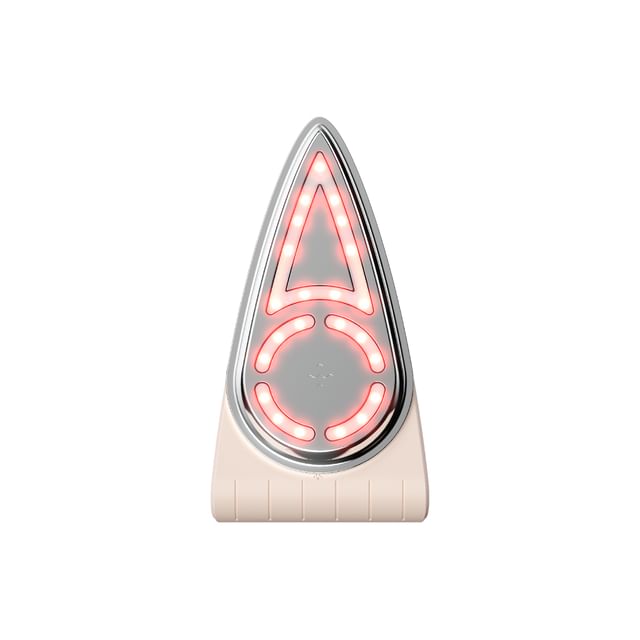
Cellology - Cellnewmer Iron
US$ 132.30
US$ 189.0030% RabattSale endet bald
Spare mit dem Doppelpack!
Versand nach USA
- Kostenloser Versand ab US$ 35 (10 - 14 Werktage)
- Rücksendungen und Umtausch
Details
Size: 240mm x 190mm x 103mm
Battery: Li-ion Battery 3.7V 2,600mAh rechargeable
This Cellnewmer Iron comes with:
Cellnewmer Iron Main Body 1 pc
Cellnewmer Iron Holder 1 pc
USB charging cable 1 pc
Adapter 1 pc
User Manual (Korean) 1 pc
Benefits:
An at-home skincare device that helps enhance elasticity of the skin and reduce the appearance of wrinkles.
Features low-frequency EMS with 3 intensity levels that helps massage the skin to tighten loose skin and restore firmness.
42°C Thermal Massage, Red LED Light, and 8,000rpm Ultra-Fine Vibration help deliver active ingredients deep into the skin.
Large applicator area with ergonomic design helps apply on the skin evenly and smoothly.
Guide for each EMS mode:
Level 1: Suitable for beginner use.
Level 2: Suitable for daily care.
Level 3: Suitable for advanced use.
Guide for each mode:
1. Boosting Mode: EMS, Vibration, and Thermal Massage for smoothing wrinkled skin.
2. Derma-In Mode: Vibration, Thermal Massage, and LED promote better absorption.
3. Relaxing up Mode: Thermal Massage and LED helps relax muscle tension and refine facial contour.
How to use:
1. Before first-time use, fully charge the Cellnewmer Iron for at least 4 hours until the LED light comes on. Charging can be done by connecting the enclosed USB charging cable to the USB charging terminal on top of the device.
*Full charging time: approximately 4 hours.
2. After cleansing and toning your face, apply an appropriate amount of Cellnewmer cream to the face.
3. Press and hold the Power/Vibration Button to turn on. Press the Power/Vibration button again shortly when the device is on to activate the vibration mode.
4. Press the Temperature button to adjust the temperature for Thermal Massage.
*Level 1 would be at 38°C with orange LED
*Level 2 would be at 41°C with red LED
5. Press the EMS button to adjust the intensity for EMS. When using the device for the first time, please start with Level 1.
6. Press the LED button to turn the Red LED on. Press again to turn it off.
7. Place the device against your skin and gently massage. The suggested order for using the device is chin, smile lines, cheeks, eye corners, temples and forehead.
*If the head of the device does not fully adhere to the skin, the electrical stimulation may feel weaker than expect.
8. After using the device for 10 minutes, gently pat the remaining cream into the skin for better absorption. Apply an additional layer of cream if your skin feels dry.
9. After use, press and hold the Power/Vibration Button to turn off, Clean the device gently using a soft, dry cloth. 10. Do not use the device for more than 10 minutes per session and use it no more than 5 times per week.
* It is suggested to use with Cellnewmer Cream.
* When using the device for the first time, please select the lowest intensity first and adjust the intensity based on the skin condition.
*Fully recharge the device every 3 months, even if it is not being used.
*Remove the accessories on your body before use.
*Do not use the device while under the influence of alcohol or drugs.
*Do not use the device on or near open wounds, healing wounds, or if you have a history of skin conditions in the desired area.
*Do not use the device if you are a child, pregnant, breastfeeding, or have an implanted medical device.
*Do not use the device immediately after laser treatments, chemical peels, plastic surgery, or while sleeping.
*If you have diabetes or wear metal braces, or any metal near the skin, please consult a doctor before using this device.
*Stop using the device if you experience excessive irritation after use.
Manufacturer’s Warranty Period and Details:
This product (Cellology – Cellnewmer Iron) is covered by a manufacturer’s warranty that expires 12 months from its shipment date.
During the warranty period, customers will be entitled to free repair service if the defective item is caused by non-human factors and within scope of warranty.
Repair for defective item will be charged after the warranty period.
Within Scope of Warranty: Limited to malfunctions occurred during normal use.
Out of Scope of Warranty: For malfunction or damage resulting from human factors listed below:
Any improper use and damage caused by accident or improper storage of the device (e.g. device dropped), any usage of the product not in the way as described in the user’s manual;
Alteration of the appearance or replacement of the product parts or dismantlement of the device on your own resulting in the device failing to function normally;
Any usage of the product not in the way as described in the user’s manual;
Repair by an unauthorized manufacturer or third party.
Battery: Li-ion Battery 3.7V 2,600mAh rechargeable
This Cellnewmer Iron comes with:
Level 1: Suitable for beginner use.
Level 2: Suitable for daily care.
Level 3: Suitable for advanced use.
Guide for each mode:
1. Boosting Mode: EMS, Vibration, and Thermal Massage for smoothing wrinkled skin.
2. Derma-In Mode: Vibration, Thermal Massage, and LED promote better absorption.
3. Relaxing up Mode: Thermal Massage and LED helps relax muscle tension and refine facial contour.
How to use:
1. Before first-time use, fully charge the Cellnewmer Iron for at least 4 hours until the LED light comes on. Charging can be done by connecting the enclosed USB charging cable to the USB charging terminal on top of the device.
*Full charging time: approximately 4 hours.
2. After cleansing and toning your face, apply an appropriate amount of Cellnewmer cream to the face.
3. Press and hold the Power/Vibration Button to turn on. Press the Power/Vibration button again shortly when the device is on to activate the vibration mode.
4. Press the Temperature button to adjust the temperature for Thermal Massage.
*Level 1 would be at 38°C with orange LED
*Level 2 would be at 41°C with red LED
5. Press the EMS button to adjust the intensity for EMS. When using the device for the first time, please start with Level 1.
6. Press the LED button to turn the Red LED on. Press again to turn it off.
7. Place the device against your skin and gently massage. The suggested order for using the device is chin, smile lines, cheeks, eye corners, temples and forehead.
*If the head of the device does not fully adhere to the skin, the electrical stimulation may feel weaker than expect.
8. After using the device for 10 minutes, gently pat the remaining cream into the skin for better absorption. Apply an additional layer of cream if your skin feels dry.
9. After use, press and hold the Power/Vibration Button to turn off, Clean the device gently using a soft, dry cloth. 10. Do not use the device for more than 10 minutes per session and use it no more than 5 times per week.
* It is suggested to use with Cellnewmer Cream.
* When using the device for the first time, please select the lowest intensity first and adjust the intensity based on the skin condition.
*Fully recharge the device every 3 months, even if it is not being used.
*Remove the accessories on your body before use.
*Do not use the device while under the influence of alcohol or drugs.
*Do not use the device on or near open wounds, healing wounds, or if you have a history of skin conditions in the desired area.
*Do not use the device if you are a child, pregnant, breastfeeding, or have an implanted medical device.
*Do not use the device immediately after laser treatments, chemical peels, plastic surgery, or while sleeping.
*If you have diabetes or wear metal braces, or any metal near the skin, please consult a doctor before using this device.
*Stop using the device if you experience excessive irritation after use.
Manufacturer’s Warranty Period and Details:
This product (Cellology – Cellnewmer Iron) is covered by a manufacturer’s warranty that expires 12 months from its shipment date.
During the warranty period, customers will be entitled to free repair service if the defective item is caused by non-human factors and within scope of warranty.
Repair for defective item will be charged after the warranty period.
Within Scope of Warranty: Limited to malfunctions occurred during normal use.
Out of Scope of Warranty: For malfunction or damage resulting from human factors listed below:
Weitere Informationen
Produktinformationen
| Importiert aus: | Südkorea |
| Artikelnummer: | 1136853437 |
Weitere Daten
Übersetzung von Kosmetik-Produktverpackungen in koreanischer Sprache (als Referenz):
Über die Marke: Cellology
Strahlkraft beginnt auf zellulärer Ebene – diese Überzeugung prägt den durchdachten und innovativen Ansatz der koreanischen Hautpflegemarke Cellology im Bereich der Anti-Aging-Pflege. Die klinisch getesteten Produkte der Marke basieren auf den neuesten Trends in der ästhetischen Behandlung und natürlichen Anti-Aging-Wirkstoffen, um der Haut Glanz, Vitalität und Elastizität zurückzugeben. Dank modernster Wissenschaft und pflegenden Pflanzenstoffen schafft Cellology die perfekte Balance zwischen Hautregeneration und Verjüngung. YesStyle ist ein autorisierter Händler von Cellology.
YesStyle ist ein autorisierter Händler von Cellology.
Verwandte Tags
Rückerstattung von Zollgebühren Bemerkungen